
Game-Key Cards Explained: What You're Actually Buying on Switch 2
That little cartridge in the shiny box might not have your game on it at all. Here's exactly how Game-Key Cards work, what they need to run, and how to spot one before you hand over your money.
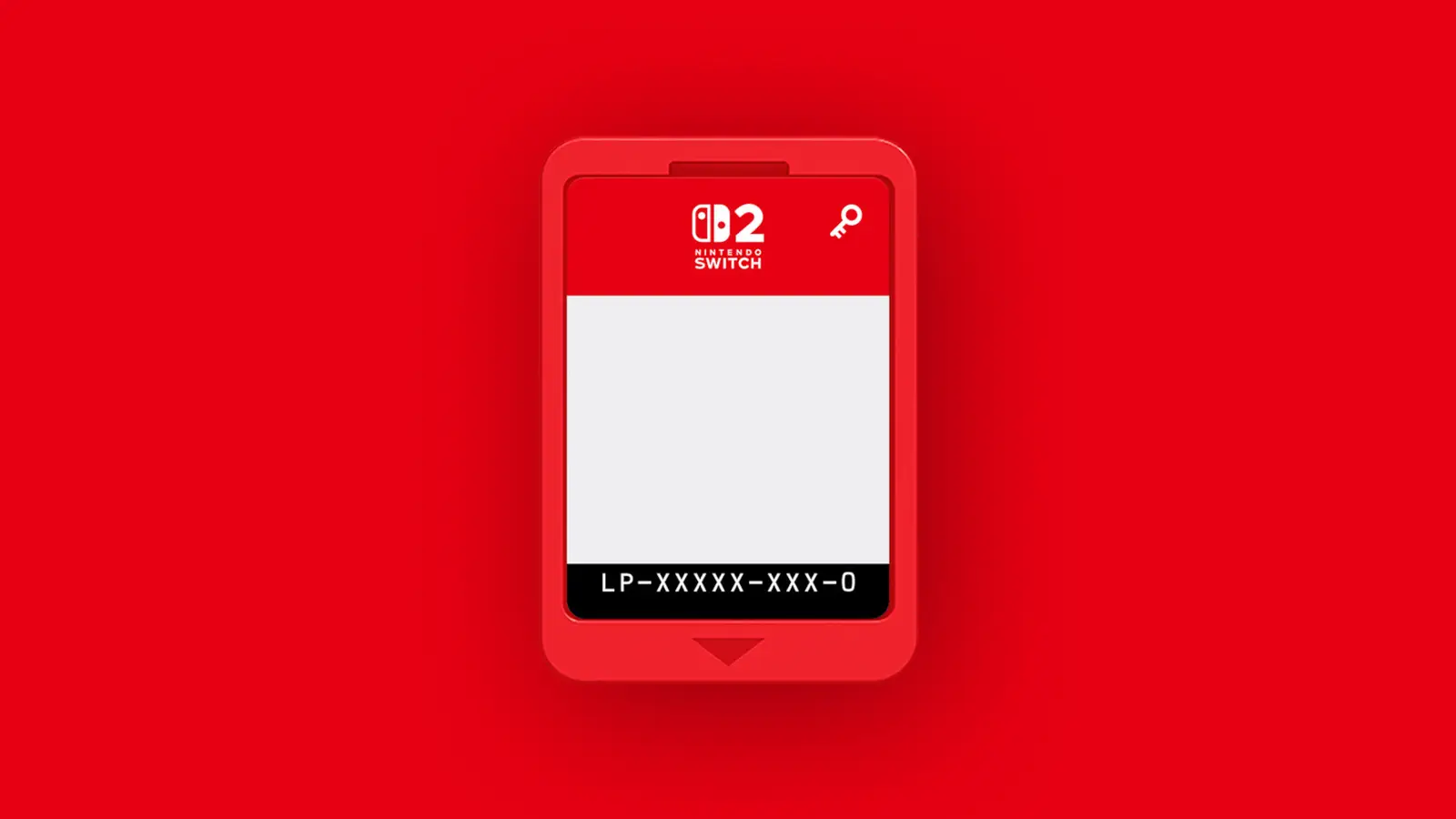
A Game-Key Card looks like an ordinary Switch 2 cartridge — the difference is what's stored on it.
If you've wandered into a game shop since the Nintendo Switch 2 arrived and picked up a box that looked, felt and cost like a normal physical game, you might have got a little surprise when you slotted the cartridge in. Some Switch 2 games ship on something called a Game-Key Card, and it's caused no end of confusion at the tills and on the forums. On the face of it, you're buying a physical game. In practice, the cartridge is a bit like a cloakroom ticket: it doesn't hold your coat, it just proves the coat is yours to collect.
I've spent a good while getting to grips with this format since the console landed in June 2025, and honestly, once you understand the mechanics it's far less scary than the headlines suggested. There are genuine upsides and some very real trade-offs, and whether it matters to you depends enormously on how you play, how good your internet is, and how much you care about reselling your games later. So let me walk you through the whole thing like a mate who's already made all the mistakes for you.
The Short Version: What a Game-Key Card Actually Is
Let's cut straight to it. A Game-Key Card is a physical game cartridge for the Switch 2 that contains no game data on it whatsoever. Instead of storing the game itself, it holds a licence "key" that unlocks a digital download of the game. When you first put the card in, the console reads that key, then downloads the full game to your system over the internet.
After the download has finished, the way you play is genuinely identical to a normal cartridge: you pop the Game-Key Card into the slot, start it up, and off you go. The card still needs to be in the machine every single time you want to play, exactly like traditional physical software. It's not a one-and-done unlock that you can then bin — the card is your ongoing proof of ownership, and without it in the slot, the game won't launch.
So it sits in a curious middle ground between a proper cartridge (all the data on the card) and a pure digital purchase (nothing physical at all). You get a box, you get a card, you can lend it and sell it — but the actual game lives on your console's storage after that first download.
How the Whole Process Works, Step by Step
The best way to demystify this is to actually run through what happens from the moment you tear the shrink-wrap off the box. It's a simple sequence, and once you've done it once it becomes second nature.
1. Open the box and insert the card
Inside you'll find a physical cartridge, just like any Switch 2 game. Slot it into the top of the console as normal.
2. Connect to the internet
The console reads the key on the card and prompts you to download the game. You'll need a working internet connection at this point — this is the one non-negotiable requirement.
3. Download to your storage
The full game downloads to either your Switch 2's internal memory or a microSD Express card. You'll need enough free space — and helpfully, the required size is printed right on the packaging.
4. Play as normal
Once installed, launch it like any physical game with the card in the slot. After that first online launch, you can play offline whenever you like.
A really important nuance here: the internet connection is only required when you launch the game for the very first time. After that initial launch has gone through, the game can be started even without an internet connection at all. So if your broadband drops out, or you're taking the Switch 2 on a train or a flight, you're fine — provided you did that first launch whilst online.
You do not need a Nintendo Account to download the game data from a Game-Key Card. That's a genuine point in the format's favour — it keeps things closer to the "buy it, own it" spirit of traditional physical media than a pure digital store purchase does.
The Storage Question: Do You Have Enough Room?
This is the big practical consideration, and it's where Game-Key Cards can catch people out. Because the game downloads onto your console rather than running from the card, you need somewhere to put it — and modern games are not small.
The Switch 2 ships with 256 GB of storage space, although a portion of that is reserved for the system itself, so you never get the full amount to play with. That sounds generous, and for a handful of games it is. But start collecting Game-Key Card titles and you'll be amazed how quickly it evaporates.
To put real numbers on it, here's how a few known titles stack up against that 256 GB pool.
Look at that Final Fantasy VII Rebirth figure. At 102.5 GB it swallows a whopping chunk of the console's total capacity all on its own — you couldn't fit two of those on the internal storage even if the whole 256 GB were free, which it isn't. This is exactly why storage planning matters so much with the Game-Key format. If you buy a big-ticket game on a Game-Key Card and haven't got the room, you simply cannot play it until you free up space or add more.
Pro Tip: read the box before you buy
The download size is printed on Game-Key Card packaging on purpose. Before you buy — especially for a large game — glance at that number and mentally compare it against your free space. It's the single easiest way to avoid getting home to a game you can't install.
Expanding Storage: You Need microSD Express
If your internal storage is filling up, the answer is a memory card — but here's the catch that trips up existing Switch owners. The Switch 2 is only compatible with microSD Express cards. Your trusty old microSD card from the original Switch will not work. That means you'll likely have to pick up a new card, and it needs to be the Express variety specifically, not a standard microSD you might have lying around in a drawer.
It's an extra cost to factor in, and worth budgeting for if you plan to lean heavily on physical Game-Key titles or big downloads. The good news is that once fitted, the console treats an Express card as valid download space, so your games can install there just as happily as onto the internal memory.
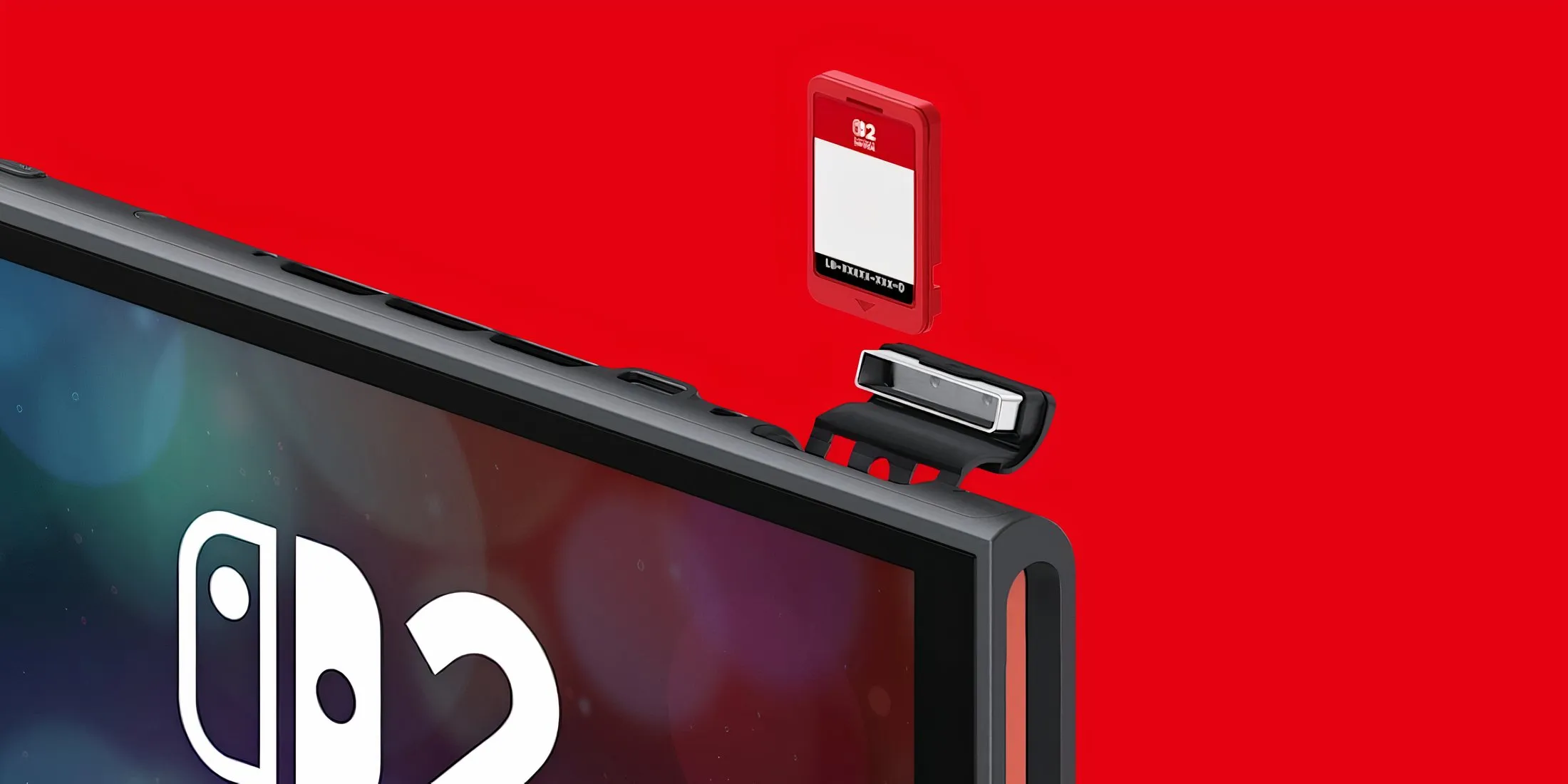
Slot a Game-Key Card in and the console downloads the full game — the card then works like a key you keep in the slot.
How to Spot a Game-Key Card Before You Buy
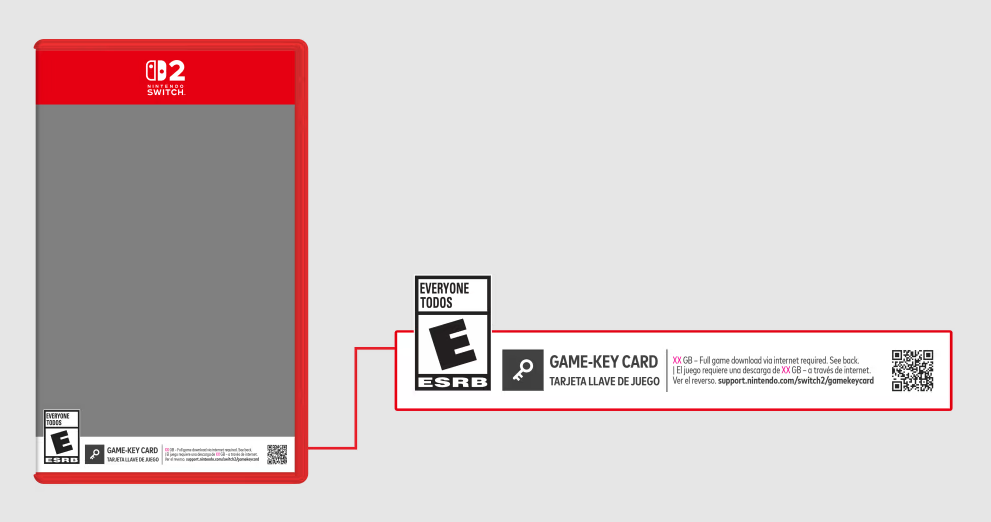
Nintendo and its partners clearly anticipated the confusion, because the packaging includes some deliberately clear signals. The trick is knowing where to look. Once you've trained your eye, you can tell a Game-Key title from a full cartridge at a glance, whether you're in a shop or scrolling an online listing.
The white banner along the bottom
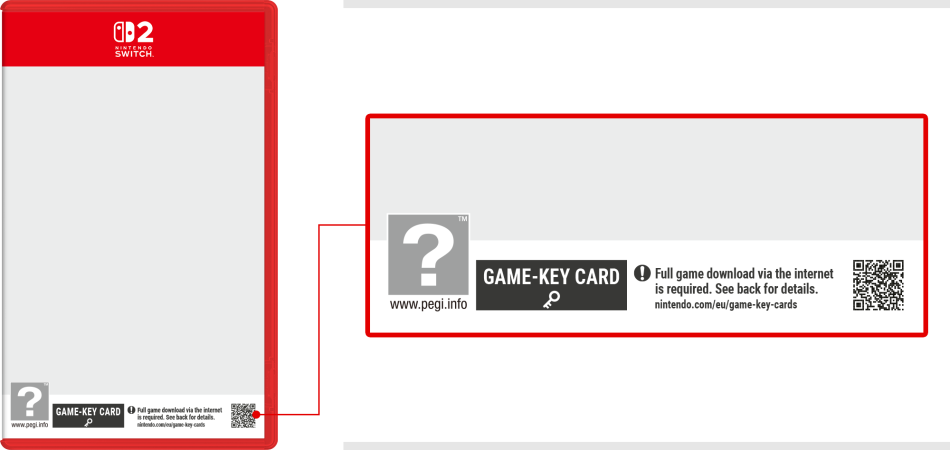
Switch 2 cases for Game-Key titles carry a distinctive white banner along the bottom of the case. That banner is the headline signal that the card is a download key rather than a full game cartridge.
The download size notice
You'll see a noticeable notice on the box stating the required download size. If the box is quoting you how many gigabytes you'll need free, that's a dead giveaway it's a Game-Key Card.
The key icon on the card itself
Look at the top right of the front of the cartridge — there's a small key icon printed there. If you've already opened the box, this is the definitive tell.
When shopping online, product listings don't always make the format obvious. If a Switch 2 game listing doesn't mention the format either way, look for photos of the box art showing that white bottom banner, or check the download-size note. When in doubt, it's worth a quick search on the specific title before ordering.
Can You Sell, Lend or Share a Game-Key Card?
This, for many people, is the make-or-break question — and it's where Game-Key Cards genuinely differ from a digital eShop purchase in a way that matters. The reassuring answer is yes: Game-Key Cards are not locked to your Nintendo Account or to a single console.
Nintendo confirmed that Game-Key Cards will work on any Switch 2, just like a regular cartridge. So if you lend one to a friend, or sell it on second-hand once you've finished, the next person can simply insert it into their own Switch 2, download the game to their system, and play it. The licence travels with the card, not with you.
That's a big deal. One of the standing frustrations with fully digital purchases is that you can never sell them on when you're done — the game is tied to your account forever. A physical Game-Key preserves that resale option, and given how well Switch games tend to hold their value on the second-hand market, that's real money you can recoup. It's the closest the digital-download era gets to the old "trade it in at the shop" model.
Where Game-Key Cards win
- You can resell or trade in the game when you're finished — something digital eShop purchases never allow
- Cards work on any Switch 2, so lending to friends and family is straightforward
- No Nintendo Account required just to download the game data
- After the first online launch, the game plays fully offline
- A physical collectible with proper box art still sits on your shelf
Where they fall short
- You must download the full game — no data lives on the card itself
- You need enough free storage, and big games like Final Fantasy VII Rebirth eat 102.5 GB
- An internet connection is mandatory for that first launch
- Expanding storage means buying a microSD Express card specifically
- The card must stay inserted to play, just like a normal cartridge
Game-Key Cards vs Full Cartridges vs Digital Downloads
To really understand what you're buying, it helps to lay all three options side by side. On the Switch 2 you broadly have three ways to own a game: a full physical cartridge with all the data on it, a Game-Key Card, or a pure digital download from the eShop. Each behaves differently across the things people actually care about.
| Feature | Game-Key Card | Full Cartridge | Digital Download |
|---|---|---|---|
| Game data location | Downloaded to console storage | Stored directly on the cartridge | Downloaded to console storage |
| Needs storage space free? | Yes — full game size | Minimal (often just updates) | Yes — full game size |
| Internet needed to start? | Yes, first launch only | No | Yes, to download |
| Card required to play? | Yes, must stay inserted | Yes, must stay inserted | No physical media |
| Can you resell it? | Yes — works on any Switch 2 | Yes — works on any Switch 2 | No |
| Nintendo Account tied? | No account needed to download | No | Yes, tied to your account |
| Physical box on the shelf? | Yes | Yes | No |
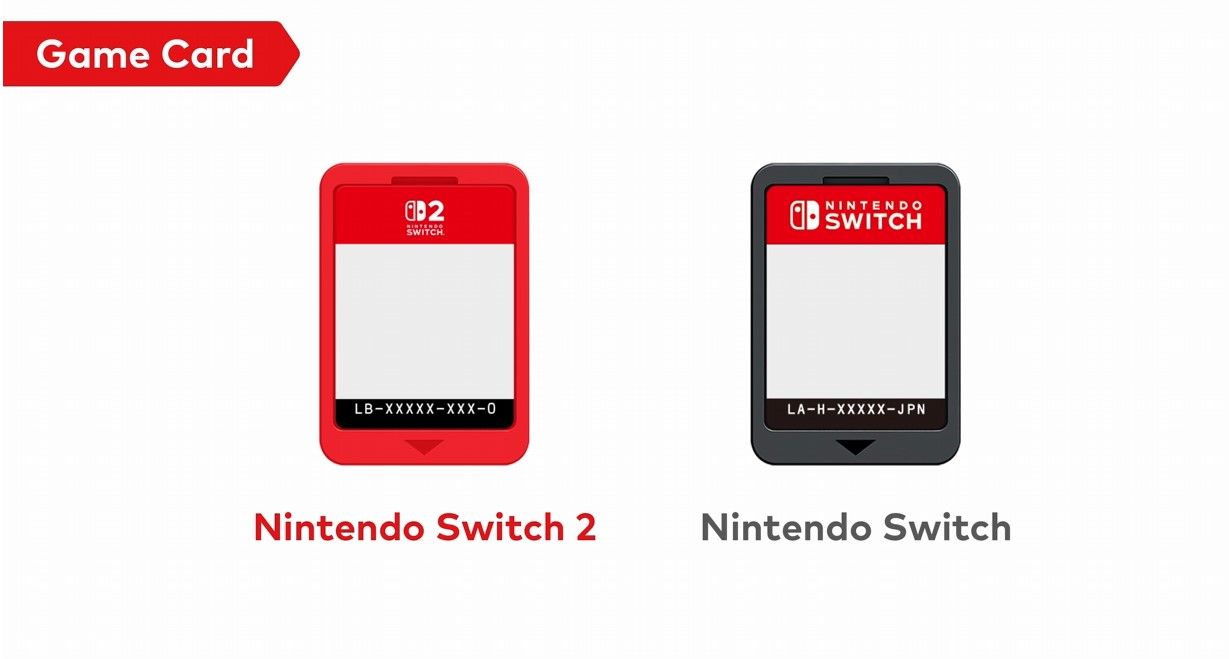
Read across those rows and the picture is clear. A Game-Key Card behaves like a digital download in terms of the storage and download requirements, but like a full cartridge in terms of resale and physical ownership. The one thing it categorically doesn't do that a real cartridge does is let you play instantly, offline, straight out of the box with no download. That's the trade-off in a nutshell.
Three ways to own a Switch 2 game — the differences are all about where the data lives and what you can do with it afterwards.
Why Do Game-Key Cards Even Exist?
It's worth understanding the reasoning, because it explains why this format isn't going anywhere and why you'll keep seeing it on third-party releases in particular. The honest answer comes down to money and technology.
The Manufacturing Cost Angle
The Switch 2 uses 64 GB cartridges as the only option for full physical releases, and those cartridges are expensive to produce — roughly $15 each. For a big-budget game that already fits on a 64 GB cartridge, that's fine. But for many titles, the maths simply doesn't add up, and that extra cost per unit eats into a publisher's margins.
Game-Key Cards are much cheaper to manufacture. The production cost for a full cartridge is estimated to be $10 to $15 more than a Game-Key Card. That difference is enormous at scale, and it means publishers can give a game a physical release when it otherwise wouldn't be profitable to do so. In other words, without Game-Key Cards, some of these games would only ever have appeared digitally. The format is the reason they exist on a shelf at all.
The collector's silver lining
If you love having physical copies on your shelf, Game-Key Cards are arguably a net positive. They mean more games get a boxed release rather than being locked behind the eShop forever. It's not the same as a full cartridge, but a boxed Game-Key you can resell beats a digital-only release you can't.
The Speed Argument
There's a technical reason too, and it's not just about pinching pennies. Ubisoft, for one, has said that their decision not to ship the full game on a cartridge had more to do with cartridge speed than manufacturing cost. Their claim is that the console's internal storage or SD-based storage offers faster data streaming than reading from a cartridge would. For big open-world games that constantly stream assets in and out — think sprawling worlds like Star Wars Outlaws — running from fast local storage rather than a cartridge can mean smoother loading and fewer hitches.
Whether every publisher's motive is quite that noble is a fair thing to be sceptical about, but the technical point stands: for certain games, downloading to fast storage genuinely can deliver a better experience than chugging data off a slower cartridge.
The Launch Landscape and Where Things Stand Now
Game-Key Cards weren't a later addition — they launched right alongside the Switch 2 in June 2025. Among the very first titles to use the format were Street Fighter 6: Years 1-2 Fighters Edition and Yakuza 0: Director's Cut, both of which arrived on 5th June 2025, the same day the console reached most regions.
Since then the format has become a mainstay of third-party publishing on the platform. There's now a lengthy list of Switch 2 games available on Game-Key Cards, spanning everything from fighting games to sprawling role-playing epics. Nintendo's own first-party titles have tended to stick with full cartridges, so in practice Game-Key Cards are something you'll encounter most often when buying games from other publishers.
Deciding on a specific Switch 2 game and want to compare formats and offers?
Check the latest price and any current bundles on Amazon.
Getting Set Up: What You Need Before Playing
If you've bought or are about to buy a Game-Key Card title, run through this quick checklist to make sure everything goes smoothly. Nothing here is complicated, but each item can stop you playing if it's not sorted.
Update your system software
To play software using a Game-Key Card, your Switch 2 must be running version 20.1.1 or higher. Head into System Settings and update before you start if you're not sure.
Get online for the first launch
You need an internet connection to download the game and complete that first launch. A stable connection makes big downloads far less painful.
Check your free space
Compare the download size on the box against your remaining storage. If you're short, either clear some space or fit a microSD Express card.
Keep the card handy
Remember the card needs to be inserted every time you play. Store it somewhere sensible so it doesn't wander off — no card, no game.
Who Should Be Happy Buying Game-Key Cards?
The format genuinely suits some players better than others. Here's how I'd break it down depending on the kind of person you are.
The trade-in trader
If you love finishing a game and selling it on to fund the next one, Game-Key Cards keep that option open in a way digital never will. A strong fit.
The well-connected home player
If you've got solid broadband and plenty of storage, that first download is a minor inconvenience and everything else works beautifully.
The shelf collector
Want boxes on display and games that might otherwise be digital-only? Game-Key Cards mean more titles get a physical release. A welcome trade-off.
The off-grid or low-storage player
Poor internet, or a console already bursting at the seams? A full cartridge that plays instantly with almost no download will serve you far better.
Frequently Asked Questions
Understanding the format upfront means no nasty surprises when you get your new game home.
The Verdict: A Reasonable Middle Ground, If You Go in With Your Eyes Open
Game-Key Cards are neither the disaster some feared nor a flawless replacement for real cartridges. They're a pragmatic compromise that keeps more games appearing on shelves, preserves your right to lend and resell, and works on any Switch 2 without tying you to an account. Those are genuine, meaningful advantages over pure digital downloads.
The trade-offs are equally real, though. You're committing storage space for the full game — and with titles like Final Fantasy VII Rebirth demanding 102.5 GB, that's no trivial matter against the console's 256 GB pool. You need internet for that first launch, and expanding your storage means a microSD Express card, not the old one from your original Switch.
My advice is simple: check the box before you buy. Look for the white banner, read the download size, and be honest about whether you've got the space and the connection to make it work. Do that, and Game-Key Cards slot neatly into your collection with barely a second thought. Ignore it, and you might get home to a game you can't yet play. Now that you know exactly what you're buying, you're in the best possible position to choose the right format every single time.